Smart relay
Automatic gate opening with a Shelly smart relay
Add a relay to your gate motor and the whole visit runs on its own, from the QR code to the open gate.
VisitorPro works with the Shelly 1 Mini Gen4, a compact smart relay. Your electrician installs it alongside the existing open switch or push-button of your gate motor, and that button keeps working as before.
With the relay in place, QR check-in is available at that entrance and the gate opens automatically as soon as an entry is approved: with a resident's PIN, by the resident on a video call, or by the guard. Every opening is logged.
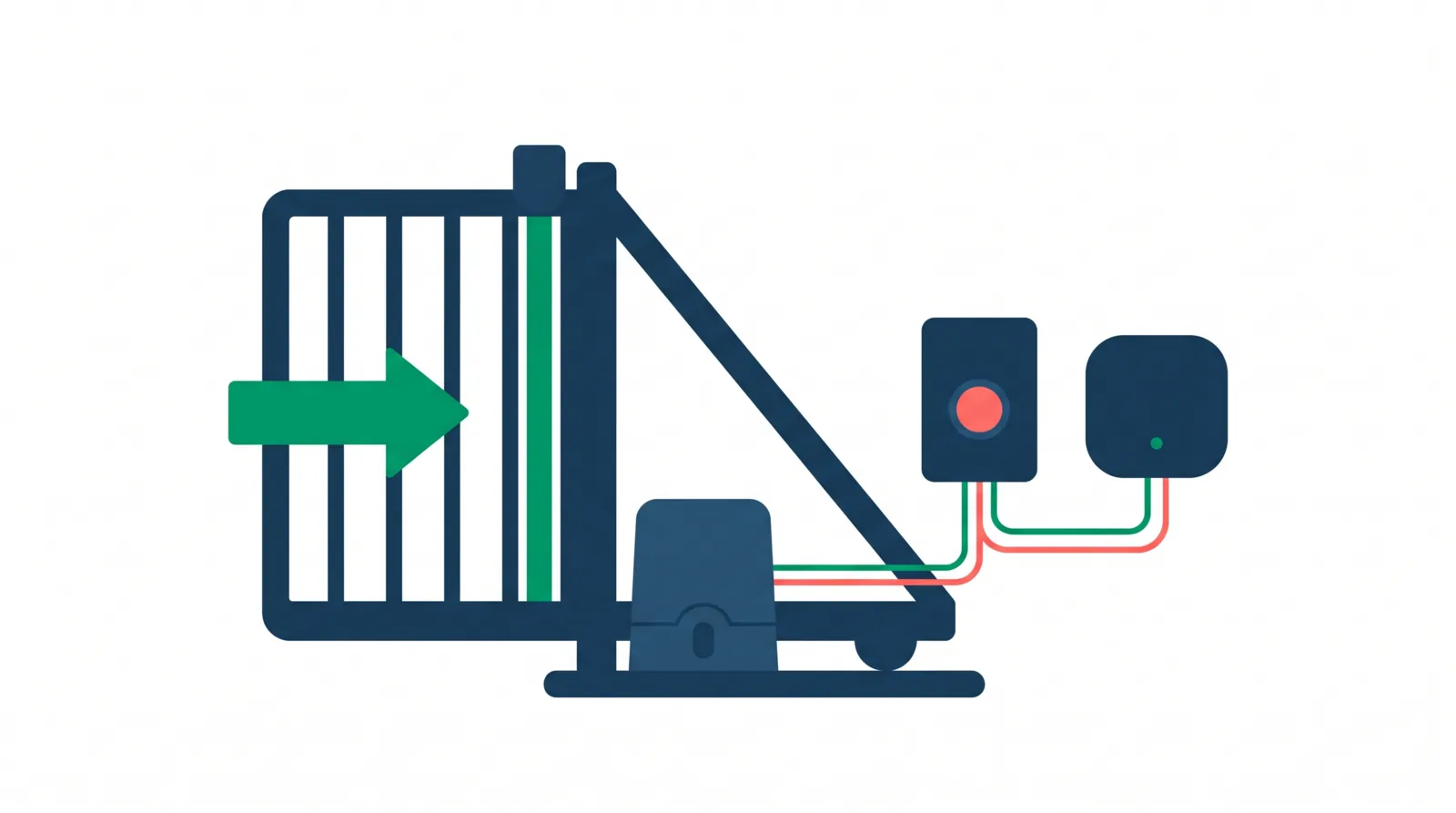
How it works: from VisitorPro to the gate motor
- 1
The relay is wired in parallel with the gate motor's open push-button (a dry contact). When it closes for about one second, the motor gets the same signal as a button press.
- 2
The relay connects to the Wi-Fi at the gate and to your Shelly Cloud account.
- 3
When an opening is authorized, VisitorPro sends the command to Shelly Cloud, which tells the relay to pulse.
- 4
VisitorPro shows whether the gate received the command.
Simplified. Terminal names vary by motor; your electrician follows the motor's manual.
The smart relay and hardware you need
- Certified relay: Shelly 1 Mini Gen4 , one per gate. Separate entry and exit gates each need their own relay.
- VisitorPro does not sell or install hardware, and we only support certified hardware. Buy it from any Shelly retailer.
- Your gate motor needs a standard open input (push-button or dry contact). Your electrician checks the motor's manual.
- The relay needs power at the motor. Your electrician chooses the power supply following Shelly's manual.
- Wi-Fi with internet at the motor. Tip: before buying, stand next to the motor and check the signal on your phone. If it is weak, an outdoor access point or a Wi-Fi extender usually solves it.
What to tell your electrician
Install a Shelly 1 Mini Gen4 with its relay output (dry contact) in parallel with the OPEN push-button input of the gate motor. Leave the existing button connected. Power it following the Shelly manual, connect it to the Wi-Fi at the gate, and add it to our Shelly account.
Set it up in your admin panel
- 1
Configuration › Gates: turn it on.
- 2
Gates › New gate. Name (e.g. "Main gate – entry"), Model: Shelly (Cloud).
- 3
Fill in the Shelly data. In the Shelly app: Home › Access And Permissions › Cloud Key › Get key gives you the server URL and the key. All Devices › your relay › Device information gives you the Device ID (12 letters and numbers) and the Channel (usually 0). Leave Pulse duration at 1 second unless your electrician says otherwise.
- 4
Test connection. It should say "Online — device reachable."
- 5
Open gate (test), only when it is safe: this physically opens the gate.
- 6
Optional: Configuration › Open a gate when registering an exit.
- 7
Next: link the gate to an access point for the How the QR intercom works.
What's included
Gate opening from VisitorPro.
The relay and its installation.
Gate automation questions
Do you sell or install the relay?
No. You buy it and your own electrician installs it. We support certified hardware only, currently the Shelly 1 Mini Gen4. Shelly 1 Mini Gen4 on shelly.com
Does the gate's own button still work?
Yes. The relay is wired alongside it, so the button and the remotes work as before.
Can I use a different relay?
Not yet. We only support hardware we have certified, currently the Shelly 1 Mini Gen4. More models may be added over time.
What happens if the Wi-Fi at the gate goes down?
VisitorPro shows that it could not reach the gate. Open it with the button or a remote as usual. Test connection helps you check it.
Does it change the motor's safety features?
No. The relay acts like a button press, so the motor's own safety features work just as they do with the button.
One relay for two gates?
No. One relay per gate, and each access point links to one gate.
Ready to turn it on?
Open your admin panel and go to Configuration › Gates.